
Minecraft Villagers Trading Guide (Java & Bedrock)
Minecraft villager trading is one of the fastest and safest ways to obtain enchanted books, diamond gear, food, emeralds, and rare resources without relying on random loot. The key to successful trading is understanding villager professions, workstations, restocking mechanics, and reputation. If your villagers are not restocking, they usually cannot reach their workstation, have not worked during the day, or their work block has been claimed by another villager. This guide explains everything you need to build a reliable trading hall in both Java and Bedrock Editions while avoiding the most common mistakes.
Introduction
Villagers have transformed from simple NPCs into one of Minecraft’s most powerful game mechanics. Whether you’re a new player looking for an easy source of enchanted gear or a late-game builder trying to automate emerald farming, learning villager trading is one of the best investments you can make.
Unlike mining for diamonds or hoping for lucky chest loot, villagers offer predictable, renewable resources. Once you’ve established a proper trading hall, you’ll rarely need to rely on random drops again.
This guide covers both Minecraft Java Edition and Minecraft Bedrock Edition, highlights the differences between them, and focuses on solving one of the biggest frustrations players face: villagers that refuse to restock their trades.
By the end of this guide, you’ll know how to:
- Build an efficient trading hall
- Assign professions correctly
- Unlock the best trades
- Fix villagers that won’t restock
- Earn thousands of emeralds efficiently
- Avoid common trading mistakes
- Optimize trading for survival and hardcore worlds
 Understand village mechanics with our Complete Minecraft Village Guide before building a trading hall.
Why This Matters
Many players underestimate just how powerful villagers become in the mid and late game.
Instead of spending hours searching for enchanted loot, villagers let you buy exactly what you need whenever you want.
Benefits include:
- Unlimited enchanted books
- Diamond armor and tools
- Infinite food supplies
- Easy emerald farming
- Renewable building materials
- Potion ingredients
- Rare decorative blocks
A well-designed trading hall can completely replace traditional resource gathering.
For example:
Instead of mining for another Fortune III pickaxe after yours breaks, you simply purchase one from your toolsmith or combine enchanted books from librarians.
That consistency saves dozens of hours over a long survival world.
What You Need to Know Before Starting
Before placing workstations randomly, it’s important to understand how villagers actually work.
How Villager Professions Work
A villager gains a profession by claiming an available workstation.
| Profession | Workstation | Best Trades |
|---|---|---|
| Librarian | Lectern | Enchanted books, Name Tags |
| Farmer | Composter | Emerald farming, Food |
| Toolsmith | Smithing Table | Diamond tools |
| Weaponsmith | Grindstone | Diamond weapons |
| Armorer | Blast Furnace | Diamond armor |
| Fletcher | Fletching Table | Stick trade, Arrows |
| Cleric | Brewing Stand | Ender Pearls, Redstone, Glowstone |
| Mason | Stonecutter | Stone blocks, Quartz |
| Cartographer | Cartography Table | Maps, Banners |
| Butcher | Smoker | Cooked food |
| Shepherd | Loom | Wool trades |
| Leatherworker | Cauldron | Leather gear |
| Fisherman | Barrel | Fish and Campfires |
Best Early Game Villagers
For most survival worlds, prioritize these professions:
- Farmer
- Fletcher
- Librarian
- Toolsmith
- Armorer
These provide the fastest path toward emerald income and enchanted equipment.
Understanding Workstations
Not sure which job block to use? Read Minecraft Workstations Explained for every profession and workstation.
Every profession depends on a matching workstation.
Examples:
- Lectern → Librarian
- Composter → Farmer
- Blast Furnace → Armorer
Villagers only restock by working at their claimed workstation.
If another villager claims it first, your intended villager cannot refresh trades.
This is one of the most common causes of “broken” trading halls.
How Trading Levels Work
Villagers progress through five career levels.
| Level | Color | Unlocks |
|---|---|---|
| Novice | Stone | Basic trades |
| Apprentice | Iron | More trades |
| Journeyman | Gold | Better items |
| Expert | Emerald | High-value items |
| Master | Diamond | Best equipment and books |
Trading increases experience until the villager reaches the next level.
Higher levels unlock stronger trades but also require larger investments.
Emeralds: Your Main Currency
Nearly every trade revolves around emeralds.
Reliable ways to earn them include:
- Selling sticks to Fletchers
- Selling pumpkins and melons to Farmers
- Selling crops
- Selling paper to Librarians
- Selling stone to Masons
Example
Suppose you own a small bamboo farm.
Convert bamboo into sticks.
Sell sticks to multiple Fletchers.
The emeralds earned can then purchase enchanted books from Librarians.
This creates a renewable trading loop with very little manual work.
Pair your trading hall with the Best Minecraft Farms for Emeralds to generate a steady emerald income.
Step-by-Step Guide
Step 1 – Find a Village
Locate a naturally generated village early in your survival world.
Villages commonly appear in:
- Plains
- Savannah
- Desert
- Snowy Plains
- Taiga
Try to secure the village before nightfall to protect villagers from zombies.
Need more villagers? Follow our Minecraft Villager Breeding Guide to expand your trading hall quickly.
Step 2 – Secure the Village
Before trading, improve villager safety.
Recommended upgrades include:
- Surround the village with fencing or walls.
- Light every path.
- Sleep regularly to skip dangerous nights.
- Place iron golems or create additional ones.
- Remove dark spawning areas nearby.
⚠️ Warning: A single zombie attack can wipe out an unprotected village, especially on Hard difficulty where infected villagers may convert instead of dying. Protect your trading area before investing time in leveling villagers.
Step 3 – Assign the Right Profession
Place the desired workstation near an unemployed villager.
Examples:
- Want enchanted books? Place a Lectern.
- Want diamond armor? Place a Blast Furnace.
- Want easy emeralds? Place a Composter.
If the villager has never been traded with, you can break and replace the workstation repeatedly until you get favorable starting trades.
Example: Getting Mending
- Place a Lectern.
- Wait for the villager to become a Librarian.
- Check the first enchanted book trade.
- If it isn’t Mending, break the Lectern.
- Replace it.
- Repeat until Mending appears.
- Complete one trade to lock the profession and trades permanently.
This method can save many hours compared to searching for rare loot.
Step 4 – Lock the Trade
A villager’s trades remain flexible until you complete your first trade.
After one successful transaction:
- Profession becomes permanent.
- Trade pool locks.
- Workstation can no longer be changed without replacing the villager.
Choose carefully before locking expensive or rare trades.
Step 5 – Level Up the Villager
Trade repeatedly to increase experience.
Higher levels unlock better offers, including:
- Diamond armor
- Diamond tools
- Powerful enchanted books
- Bells
- Lanterns
- Glass
- Quartz
- Ender Pearls
Aim to level at least one villager of each important profession.
Step 6 – Understand Restocking (Most Important)
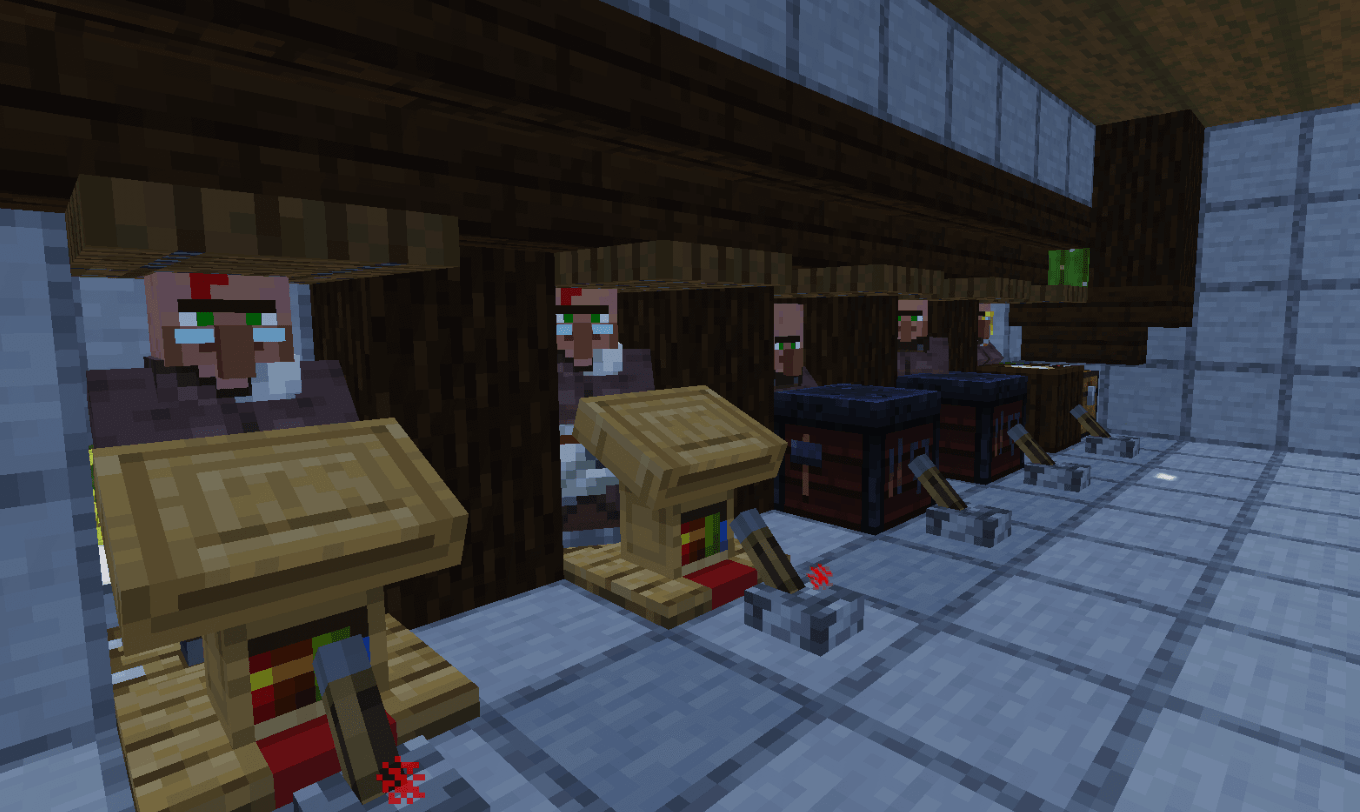
Learn how to design an efficient Minecraft Trading Hall to organize villagers and maximize trading efficiency.
The most common complaint players have is:
“My villagers won’t restock.”
In almost every case, one of these issues is responsible.
Villagers must be able to reach their workstation
Blocking the workstation with solid blocks, trapdoors placed incorrectly, or cramped layouts can prevent a villager from working.
Always confirm the villager can pathfind to the correct job block.
The workstation must belong to that villager
Sometimes another villager claims the workstation first.
Symptoms include:
- Green particles appearing around the wrong villager
- One villager restocking while another never does
- Profession changing unexpectedly before trades are locked
A simple fix is to temporarily isolate villagers and assign workstations one at a time.
Restocking happens during the workday
Villagers only restock during their scheduled working hours.
If you trade repeatedly late at night or while they are sleeping, exhausted trades will remain unavailable until the next work period.
Java vs. Bedrock Differences
Both editions require access to the correct workstation, but Bedrock Edition can be more sensitive to workstation linking and village boundaries. If villagers repeatedly fail to restock in Bedrock, reassign workstations one villager at a time and avoid placing multiple identical job blocks until each villager has correctly claimed one.
💡 Pro Tip: Label workstations or keep villagers in clearly separated stalls while assigning professions. Spending a few extra minutes organizing your trading hall prevents hours of troubleshooting later.
Beginner Tips
If you’re new to villager trading, focus on building a solid foundation before chasing rare enchanted books or Master-level trades. These tips will help you avoid common frustrations.
1. Start with Farmers and Fletchers
The easiest way to earn emeralds early is by trading renewable resources.
| Profession | Easy Trade | Why It’s Great |
|---|---|---|
| Farmer | Wheat, Carrots, Potatoes, Pumpkins, Melons | Easy to automate |
| Fletcher | Sticks | Bamboo or tree farms provide endless sticks |
| Librarian | Paper | Sugar cane farms produce paper quickly |
Once you have a reliable emerald income, you can spend those emeralds on better gear instead of mining for replacements.
2. Don’t Trade With Every Villager
New players often keep every villager they find.
Instead, keep only villagers with useful professions.
Recommended priorities:
- Librarian
- Farmer
- Fletcher
- Armorer
- Toolsmith
- Weaponsmith
- Cleric
- Mason
Less useful professions can be added later if your world requires them.
3. Lock Good Trades Immediately
Suppose you finally roll a Librarian selling Mending.
Don’t leave it unlocked.
Complete one trade immediately so the offer becomes permanent.
Many players accidentally break the workstation first and lose a rare trade.
⚠️ Warning: Never remove a workstation before locking a valuable trade. An unemployed villager can generate completely different offers when it claims the workstation again.
4. Build Near Your Base
Walking thousands of blocks to trade quickly becomes tedious.
A trading hall close to your storage system makes repairs, enchanting, and selling resources much faster.
Advanced Tips
Save thousands of emeralds by learning How to Cure Zombie Villagers for permanent trade discounts.
Once you understand the basics, you can optimize your trading hall for maximum efficiency.
Create an Emerald Economy
Instead of treating trades individually, connect farms together.
Example trading loop:
Bamboo Farm → Sticks → Fletcher → Emeralds → Librarian → Enchanted Books
Or:
Pumpkin Farm → Farmer → Emeralds → Armorer → Diamond Armor
These loops reduce grinding and keep your resources renewable.
Cure Zombie Villagers for Better Prices
One of the strongest mechanics in Minecraft is curing zombie villagers.
How It Works
- Allow a villager to become a zombie villager.
- Throw a Splash Potion of Weakness.
- Feed it a Golden Apple.
- Wait for the curing process.
After being cured, the villager usually offers significant discounts.
In many worlds, this can reduce the cost of valuable enchanted books from dozens of emeralds to only a handful.
💡 Pro Tip: Cure your best Librarians first. Lower book prices save thousands of emeralds over the life of a survival world.
Build Automatic Crop Farms
Farmers can harvest and replant crops.
By combining villagers with collection systems, you can automate food production while generating items for trading.
Popular choices include:
- Wheat
- Carrots
- Potatoes
- Beetroot
These farms pair perfectly with Farmer trades.
Organize Villagers by Profession
Instead of placing villagers randomly, group them logically.
Example layout:
- Librarian Wing
- Armor Wing
- Weapon Wing
- Farming Wing
- Utility Wing
This makes finding trades much faster, especially in large survival worlds.
Best Villager Professions Ranked
S Tier
Librarian
Best for:
- Mending
- Unbreaking
- Silk Touch
- Fortune
- Efficiency
- Protection
- Name Tags
- Glass
No other villager has a greater impact on long-term survival.
Farmer
Excellent for:
- Emerald farming
- Food
- Golden Carrots
- Easy renewable trades
Perfect for beginners.
A Tier
Fletcher
Strengths:
- Stick trade
- Arrow sales
- Bows
- Crossbows
One bamboo farm can supply enormous numbers of sticks.
Armorer
Offers:
- Diamond armor
- Enchanted armor
- Bells
- Shields
Ideal once you stop crafting your own armor.
Toolsmith
Provides:
- Diamond Pickaxes
- Diamond Axes
- Diamond Shovels
- Enchanted tools
A reliable backup if your equipment breaks.
B Tier
Cleric
Useful for:
- Ender Pearls
- Glowstone
- Redstone
- Bottle o’ Enchanting
Helpful throughout progression but less essential than the professions above.
Mason
Often overlooked.
Trades include:
- Quartz Blocks
- Stone
- Terracotta
- Decorative blocks
Excellent for builders.
Best Enchanted Books to Buy
Get the most from your enchanted books with our complete Minecraft Enchanting Guide.
| Enchantment | Priority | Why |
|---|---|---|
| Mending | Essential | Repairs gear with experience |
| Unbreaking III | Essential | Extends durability |
| Efficiency V | Essential | Faster mining |
| Fortune III | High | More ore drops |
| Silk Touch | High | Mine special blocks |
| Protection IV | High | Better survival |
| Feather Falling IV | High | Reduces fall damage |
| Sharpness V | Medium | Strong melee weapons |
| Power V | Medium | Strong bows |
| Looting III | Medium | Better mob drops |
A complete library of these books can eliminate most RNG from enchanting.
Repair Mending gear faster using one of the Best Minecraft XP Farms.
Solving Villagers That Won’t Restock
This is the issue most players search for.
Use the checklist below.
Problem: Workstation Is Blocked
Symptoms
- Red X appears on trades.
- No refreshed stock.
- Villager ignores workstation.
Fix
Remove obstacles.
Ensure the villager can physically stand beside the workstation.
Problem: Wrong Villager Claimed the Workstation
Symptoms
- Another villager walks toward it.
- Trades never refresh.
- Multiple villagers compete.
Fix
Remove every workstation.
Replace them one by one.
Watch for green particles.
Problem: Trading Hall Is Too Crowded
Villagers struggle to pathfind in cramped builds.
Give each villager:
- Dedicated workstation
- Enough walking space
- Clear access
Simple layouts are usually more reliable than overly compact designs.
Problem: You Traded Too Much
Villagers have limited stock.
When a trade is exhausted:
- Wait for the villager to work.
- Allow the workday to occur.
- Trade again after restocking.
Trying repeatedly won’t force a refresh.
Problem: Workstation Was Destroyed
Even a brief removal of the workstation can interrupt normal trading until it is replaced and reclaimed.
Always return the original workstation to the same villager.
Problem: Bedrock Linking Issues
Bedrock players occasionally encounter incorrect workstation assignments.
Reliable fixes include:
- Remove nearby duplicate workstations.
- Isolate one villager.
- Place only its workstation.
- Wait for green particles.
- Repeat for each villager.
This takes longer but greatly reduces incorrect links.
Common Mistakes
Ignoring Village Safety
Losing experienced villagers to zombies is one of the most painful setbacks.
Always:
- Light your base.
- Fence entrances.
- Keep Iron Golems nearby.
Unlocking Bad Trades
Many beginners trade too early.
Take time to reroll Librarian offers before completing the first trade.
Building Too Small
Trading halls often expand over time.
Leave room for:
- New professions
- Storage
- Future breeding
- Decoration
- Easy navigation
Forgetting Backup Villagers
Accidents happen.
Having a second Librarian with important books can save hours of rebuilding.
Best Trading Hall Strategies
Small Survival Base
- 10–15 villagers
- Compact hallway
- Easy access
- Low maintenance
Perfect for solo players.
Build an Iron Farm Tutorial for Java & Bedrock to produce unlimited iron while supporting villager mechanics.
Mid-Game Trading Hall
- Every profession
- Organized by type
- Emerald storage
- Nearby crop farms
Balanced for most survival worlds.
Large Mega Base
- 40+ villagers
- Automatic breeder
- Iron farm nearby
- Crop farms
- Sorting system
- Rail transport or Nether shortcuts
Best for long-term worlds and multiplayer servers.
💡 Pro Tip: Build your trading hall close to your enchanting area, storage room, and experience farm. Keeping these systems together reduces travel time and makes repairing, enchanting, and replacing equipment much more convenient.
Frequently Asked Questions
Why won’t my Minecraft villagers restock their trades?
The most common reason is that the villager cannot access its claimed workstation during the workday. In both Java and Bedrock Editions, villagers must be able to reach the workstation they have claimed in order to refresh their available trades. If another villager has claimed that workstation, or if it has been removed or blocked, restocking will fail.
Other possible causes include:
- Trading outside working hours
- Incorrect workstation assignment
- Broken pathfinding
- Village linking issues (more common in Bedrock)
If your trading hall has many villagers, isolate them temporarily and verify each villager is connected to the correct workstation.
How many times can villagers restock?
Villagers generally restock their trades up to twice during a Minecraft day, provided they can reach their workstation during working hours.
If a trade is marked with a red “X,” wait until the villager has had a chance to work rather than continuing to click the trade.
Can villagers lose their profession?
Yes—but only if:
- They have never been traded with, and
- Their workstation is removed.
Once you’ve completed at least one trade, the villager’s profession and trade offers become permanent.
What is the best villager profession?
For most players, Librarian is the strongest profession because it grants access to enchanted books such as:
- Mending
- Unbreaking III
- Fortune III
- Silk Touch
- Efficiency V
- Protection IV
These enchantments remain useful throughout the entire game.
Which villager makes the most emeralds?
Farmers and Fletchers are usually the easiest emerald generators.
Farmers
Excellent for selling:
- Pumpkins
- Melons
- Wheat
- Carrots
- Potatoes
Fletchers
Excellent for selling:
- Sticks
- Flint
- String (depending on trade availability)
Because sticks are easy to produce with tree or bamboo farms, Fletchers are often the fastest source of emeralds.
Can villagers run out of trades forever?
No.
Trades are only temporarily exhausted.
Once the villager works at its workstation during the workday, the available stock refreshes automatically.
Do villagers need beds to trade?
For trading alone, access to the correct workstation is the critical requirement. Beds are primarily important for village mechanics, breeding, and maintaining a functioning village. A villager can still trade and restock without sleeping, provided it can work at its workstation.
Are Java and Bedrock villager mechanics the same?
The overall trading system is very similar, but there are some practical differences.
| Feature | Java Edition | Bedrock Edition |
|---|---|---|
| Profession system | ✔ | ✔ |
| Trading levels | ✔ | ✔ |
| Restocking | ✔ | ✔ |
| Workstation linking | Generally straightforward | Can be more sensitive |
| Trading hall setup | Easier to troubleshoot | Requires careful workstation assignment |
If you play Bedrock, assigning workstations one villager at a time is the safest approach.
Can I move villagers safely?
Yes.
Common transport methods include:
- Boats
- Minecarts
- Water streams
- Nether tunnels for long-distance travel
Minecarts are usually the fastest and most reliable option for transporting villagers over land.
Should I cure zombie villagers?
Absolutely.
Curing zombie villagers is one of the best long-term investments in Minecraft. Discounted trades save hundreds—or even thousands—of emeralds over the lifetime of a survival world, especially when applied to Librarians and Armorers.
💡 Pro Tip: Before curing a zombie villager, prepare a secure enclosure with a bed and the correct workstation. This allows you to assign the desired profession immediately after the curing process and keeps the villager safe from hostile mobs.
Related Searches
Players interested in villager trading often look for:
- Best Librarian trades in Minecraft
- How to get Mending books quickly
- Why villagers won’t restock
- Best villager professions
- How to build a trading hall
- Villager breeding guide
- Zombie villager curing guide
- Best emerald farm
- Iron farm with villagers
- Minecraft workstation guide
Final Verdict
Villager trading is one of the most rewarding systems in Minecraft. While it can seem confusing at first, understanding professions, workstations, and restocking mechanics transforms villagers into a dependable source of equipment, enchantments, food, and emeralds.
For new players, start with Farmers, Fletchers, and Librarians. These three professions provide an excellent balance of income and utility, making it easier to progress without relying on luck.
As your world grows, expand into a dedicated trading hall with organized workstations, protected villagers, and automated crop farms. Investing time in proper layout and workstation assignment will save countless hours of troubleshooting later—especially in Bedrock Edition.
If your villagers stop restocking, don’t assume the world is bugged. In most cases, the fix is simple: verify that each villager can reach its own workstation during working hours and that no other villager has claimed it.
With a little planning, you’ll have a renewable economy that supports everything from enchanted tools to diamond armor, keeping your survival world well-equipped for every adventure.
Starting a new survival world? Check out our Best Minecraft Survival Tips for Beginners for faster progression.